


Glitter Neon Grapefruit Siser HTV A3 (42x29cm)
In Stock
SKU: G0104A3

Siser Glitter Heat Transfer Vinyl is perfect for adding some sparkle and eye catching detail to your projects and garments. It features high thickness glitters and adhesive polyester backing. If you're looking to create sparkle and bling, it's a must have!
Available in a variety of fantastic colours, Glitter HTV is the perfect choice for children's clothes, dance and active wear, or even festive projects, and it doesn't shed any glitter.

Cutting settings
Settings may vary based on blade condition and age of machine. Always perform a test cut prior to cutting designs.
Brother ScanNCut
- Blade: Standard, 3
- Cut speed: 1
- Cut pressure: 5
Cricut

- Blade: Standard
- Setting: Iron-on
Silhouette Cameo

- Blade: Standard, 4
- Material: Heat Transfer, Smooth
- Speed: 8
- Force: 11
Application
Using a Heat Press (recommended)
- Preheat your fabric for 3-5 seconds to remove any wrinkles and open up the fibers on your fabric.
- Peel off the grid-lined backing from your transfer.
- Place the transfer paper with the image printed FACE UP on to your fabric.
- Place the parchment paper onto the exposed image to protect the press’ platens from the ink.
- Press with firm pressure for 15-20 seconds at 160°C
- Wait 30-40 Seconds for the transfer to cool before removing the parchment paper.
Using a an iron
- Iron your fabric for 30 seconds, or until it is nicely heated up and smooth of any wrinkles/creases
- Peel off the grid-lined backing from your transfer.
- Place the transfer paper with the image printed FACE UP on to your fabric.
- Place the parchment paper onto the exposed image to protect the iron from the ink.
- Start ironing your image. Make sure ALL AREAS of the image receive the same amount of heat by moving the iron constantly in SMALL CIRCLES and covering all the areas, especially the edges. Apply FIRM and CONSTANT PRESSURE to the Iron. (You can’t put too much pressure on the image – the more the better!)
- Iron for about 2 minutes.
- Once ironed, leave the image to cool for about 1 minute and then remove the parchment paper. The image should be securely adhered to the fabric. If there are any areas that have not adhered well, replace the parchment paper and iron for 1 more minute.
Washing

Wait 24 hours before first wash

Suitable for dry cleaning

Maximum 40°C

Do not tumble dry

Do not use bleach or other agressives chemical agents
Suitable textiles

100% cotton

100% polyester, eslastan

Poly/cotton blends (not for dye sublimated fabrics)
This product is REACH compliant
Certified Öko-Tex® Standard 100 Class I and VeganOK

| SKU | SHTVGLITTER |
|---|---|
| Brand | Siser |
| Products available | |
G0104A3
| Glitter Neon Grapefruit Siser HTV A3 (42x29cm) |
|
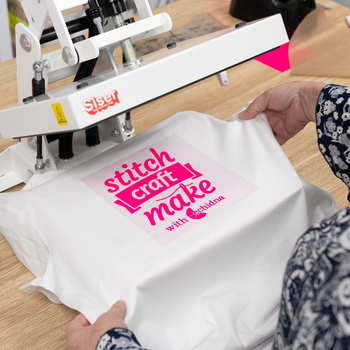
Heat Transfer Vinyl - How To Guides
Heat transfer media is designed to move with fabric so it is the perfect media to add some personalisation to a garment and is suitable for most items made of fabric. Transfer media is typically made up of 3 layers; a clear protective backing, the coloured media and a heat activated fabric adhesi...
Read more
Heat Transfer Vinyl Craft Ideas
Looking for inspiration for your next heat transfer vinyl project? From personalised clothing and accessories to bags, gifts and home décor, heat transfer vinyl is a fun and easy way to add your own designs to a variety of fabric projects. Custom HTV Cap View now Aussie To...
Read more
How To Layer Heat Transfer Vinyl
Explore the process of creating multi-coloured designs by layering heat transfer vinyl with Rachael. Watch as she demonstrates the method of layering intricate details onto fabric while ensuring the durability of previous layers. Gain invaluable insights, tips, and troubleshooting techniques along t...
Read more
HTV Application & Pressing Times Guide
Every heat transfer vinyl is a little different in regards to pressing time, temperature, pressure, and peel! We have created this handy chart showing the relevant temperature and time recommendations for our most popular HTV. 100% Cotton 100%...
Read more
HTV vs. Adhesive Vinyl
How to tell the difference between Heat Transfer Vinyl (HTV) and Adhesive Vinyl If you’re a crafter, you’ve likely built up a collection of both Heat Transfer Vinyl (HTV) and Adhesive Vinyl. But what if they get mixed up? Here’s how to tell them apart and make sure each one ends up where it belon...
Read more
Siser to Poli-Flex Turbo HTV Conversion
Our conversion chart is designed to help you seamlessly transition from Siser EasyWeed HTV to Poli-Flex Turbo HTV, ensuring you achieve the same high-quality results with your projects. This chart matches the colours between ranges allowing you to confidently substitute Siser EasyWeed with Poli-Flex...
Read moreMore From This Category




Your Browsing History

You will have remaining
You'll be able to access this product immediately. It will also be available in your website account and we'll send you a confirmation email.
Item added for comparison

You're off to a great start! Add more products to compare features, prices, and find your perfect match.
View and compare your selected products any time using the tab on the right.